Scans, emails, files and incoming invoices end up where your department already works: in the attachment list of the record — as a GOS or DMS attachment, via SAP ArchiveLink and CMIS. No hunting through network drives, no second archive system to keep in mind.

Each can be used on its own, and each closes a gap that is the same in almost every SAP organisation. Together they cover the entire route — from incoming paper to answering a question years later.
CaptureSo the document arrives in the first place
Read incoming invoices, validate them against SAP S/4HANA® and pre-enter them as a parked supplier invoice in MM — with and without a purchase order reference. XRechnung and ZUGFeRD as XML, scanned paper via text recognition and AI. Nothing is ever posted: release stays in the SAP standard. The same solution also files any other document on the SAP object on request.
Learn moreScan paper documents or take in existing PDFs and assign them to the SAP S/4HANA® object in the same pass — by barcode, text recognition or AI model. Additionally files straight into SharePoint, Azure or CMIS. All TWAIN scanners, six languages, no SAP skills at the scanning station.
Learn moreFileSo it ends up where it belongs
File emails and their attachments on the SAP S/4HANA® record with one click. The add-in detects business object and number in the mail, validates them against SAP and files as a GOS or DMS attachment. Modern, for Exchange Online and every current Outlook version.
Learn moreThe same filing from Google Workspace, as a side panel directly inside Gmail. Mail content passes exclusively through your own service — never through CaRD servers.
Learn moreRight click, “Send to”, done: any file from the drive onto the SAP S/4HANA® object — validated and with the right extension. No admin rights, no training, in 23 languages.
Learn moreStore & findSo it is stored cheaply and found again quickly
Speaks SAP ArchiveLink and CMIS 1.1 and files your documents wherever you want: SharePoint, Azure Blob Storage, Amazon S3, STACKIT or a file system. Official SAP certification passed, holds and retention periods included.
Learn moreThe archive in the browser — for everyone without SAP S/4HANA®. Search, open and file with four separate permissions; holds and retention periods take effect above those permissions.
Learn moreSearch directly on an Azure storage account, with no connector in between — with facets, search and an audit export including checksums. The way to switch off an expensive legacy archive without losing the ability to answer.
Learn moreDocuments that are printed, filed in binders or forwarded by email create search time, errors and compliance risk. Direct integration replaces those steps with a single click — audit-proof and traceable.
Fewer touches per document, no duplicate filing, no printing just to archive. That saves measurable time in finance, purchasing and sales.
Documents are attached to the right SAP object — order, purchase order, material document, document info record. No searching through drives or mailboxes.
Standardised filing with metadata and permissions. In your own data centre, in SharePoint or in the cloud (Azure, S3) — you keep data sovereignty.
Nobody needs eight tools at once. Almost everyone, however, recognises one of these situations — and that is where you start.
Capturing every invoice twice — once at the supplier, once at your site — is the most expensive habit in accounts payable. Have them read, validated and pre-entered; releasing stays with you.
As long as documents sit in personal mailboxes, your process knowledge depends on individuals — and disappears with holiday, sickness or resignation. One click files the mail on the document, where everyone can see it.
Drawings, contracts and inspection reports stay on project drives because the route into SAP is too cumbersome. A right click is short enough that people actually use it.
Scanning alone does not help — an image without an assignment is just a new search problem. Splitting and assigning has to happen in the same pass, otherwise it never happens.
Classic archive systems charge by volume; cloud storage costs a fraction. That difference can only be realised if SAP is able to address the cheap storage at all.
It still does not get switched off, because somebody has to retrieve something in an audit. Establish the ability to answer on the storage first — then the legacy system may go.
Warehouse, service, quality assurance, subsidiaries: anyone who only needs to read does not need a SAP licence — they need a window with clean permissions.
No stock imagery — these are the interfaces your people would actually work with.
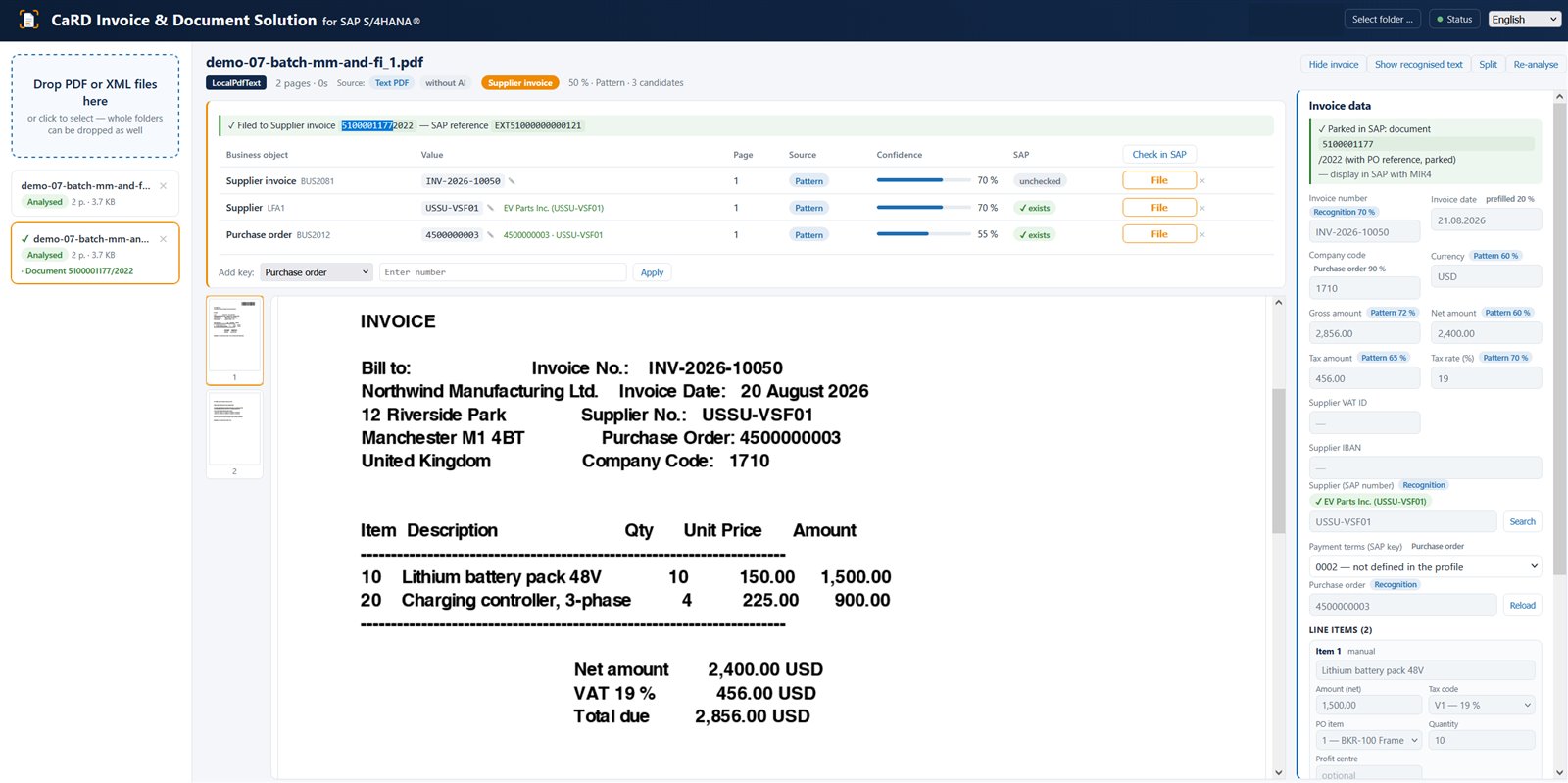

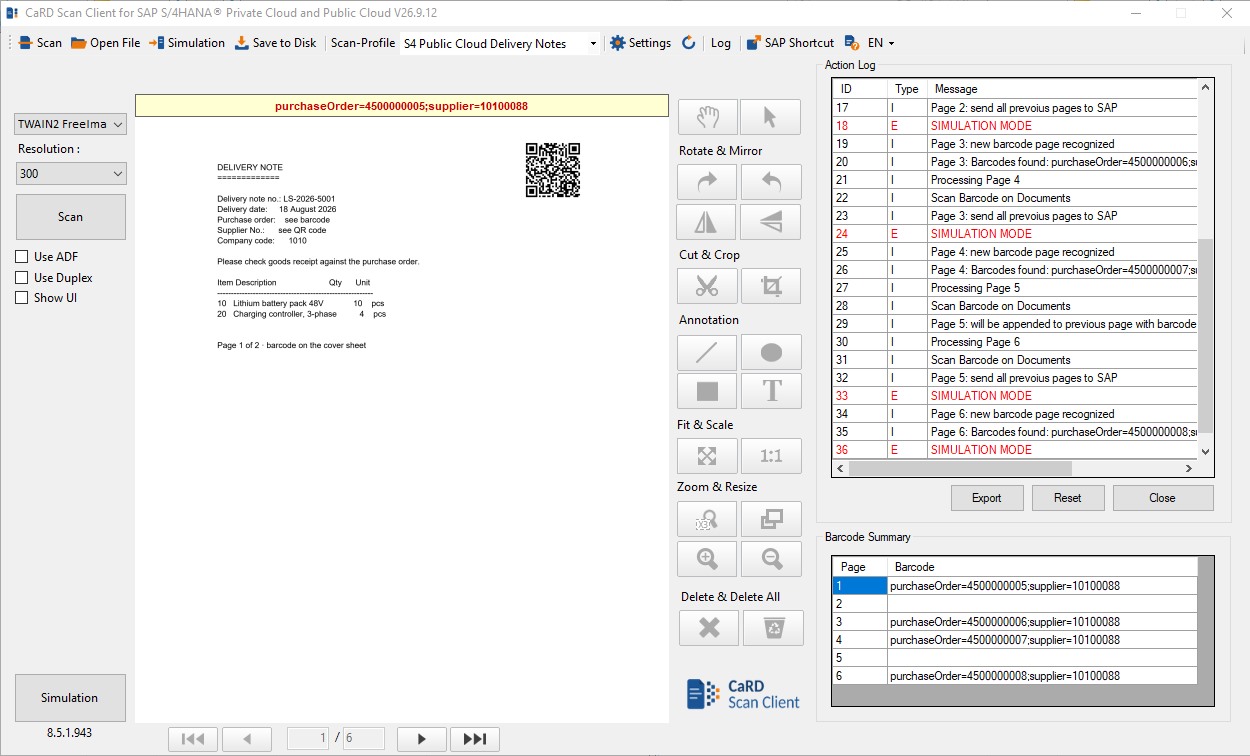
The CaRD Connector speaks both classic SAP ArchiveLink and the modern CMIS protocol. So you file scans and Outlook emails straight into SAP — and freely choose where the content physically lives.
File the Outlook mail and its attachment audit-proof on the SAP object.
Scan documents, assign by barcode, straight into the SAP archive.
Choose the storage location — data sovereignty stays with you.
CMIS and ArchiveLink instead of proprietary lock-in.
Whether classic on-premise, managed cloud or public cloud — we connect your document processes through the right open interfaces.
 SAP partner since 1994 — a solution by CaRD Gesellschaft für EDV-Beratung mbH
Long-standing SAP and Microsoft partnerships and support for all leading storage and cloud platforms.


Supported platforms & storage




Scan or pick a mail.
Barcode or SAP object.
One click to the archive.
Right on the SAP document.
Indirect routes — print, scan, mail, upload manually — create copies, version chaos and gaps in the audit trail. Direct integration files the original document once, in the right place.
Yes — with the CaRD Workspace. It opens your archive in the browser: search, open and file, with separate permissions for read, create, update and delete. Holds and retention periods take effect above those permissions — a protected document cannot be removed even with a delete permission.
Yes. Alongside the Outlook add-in there is a Gmail add-on for Google Workspace. It detects the business object in the mail, validates it against SAP and files the mail with its attachments on the document. Mail content passes exclusively through your own service — never through CaRD servers.
Yes — with our invoice capture for SAP. It reads incoming invoices, validates them against your SAP system and pre-enters them as a parked supplier invoice in MM — with and without a purchase order reference. There is deliberately no standalone FI document entry and nothing is ever posted: release and posting stay in the SAP standard workflow. XRechnung, ZUGFeRD and Factur-X are read directly as XML, scanned paper via text recognition and AI models; the PDF then hangs in the attachment list on the document.
Yes — the CaRD Mail Add-In. It detects the SAP business object and its ID in the email, validates it against your SAP system and files the mail including attachments as a GOS or DMS attachment. A modern add-in for Exchange Online — running with SAP S/4HANA on-premise as well as with SAP S/4HANA Public Cloud.
With SAP S/4HANA (on-premise and private cloud), RISE with SAP, SAP Public Cloud and SAP ECC. Integration is via ArchiveLink and/or the CMIS protocol.
No. The scan client and Outlook add-on are standalone applications with a simple interface. Assignment to SAP objects runs automatically via barcodes or the subject line.
Wherever you want: in your own data centre (file system), in SharePoint, or in the cloud (Azure Blob Storage, Amazon S3). The CaRD Connector abstracts the backend.
Yes. Our add-ons are ArchiveLink-compatible and work with all common SAP archive systems — the CaRD Connector is an option, not a prerequisite.
The filing tools for Outlook, Gmail and Windows Explorer are quick to roll out, because nothing has to be installed on the workstation. Rolling out scanning, invoice and archive processes depends on your SAP objects and is typically productive within a few days.
Of course. We offer a no-obligation online demo and can provide a test installation on request. Just get in touch via the contact form.
Tell us which SAP system you work with and where documents get stuck at your site — we will sort out the rest in a conversation.
